The Claude about-me file is the setup that most Claude users have never done. It pays back on every session after. Most people retype the same context every time: who they are, what they do, how they write. Same explanation. Different wording. Pure friction before any real work starts. Eventually, it stops feeling like a productivity tool. It starts feeling like a form you fill out just to begin. The about-me.md file in Claude Cowork eliminates that. The file lives inside your Claude Cowork folder. Claude reads it before every session, automatically, every time, no manual step required. This is not a workaround. Anthropic built this as the intended way to give Claude a persistent context across every task. Five things go inside it: who you are and what you do, your tone and writing style, your audience and what they care about, what you hate seeing in Claude's output, and the rules Claude must never break. Write them once. Every session runs with them from that point forward. Setup takes under 15 minutes. Open Cowork. Paste the interview prompt. Answer Claude's questions. The file builds itself from your answers. Add one global instruction in Settings. Done. This post covers what belongs in the file, the exact setup prompt, the one settings change that locks it in, and why this is the highest-leverage Claude habit most people skip. 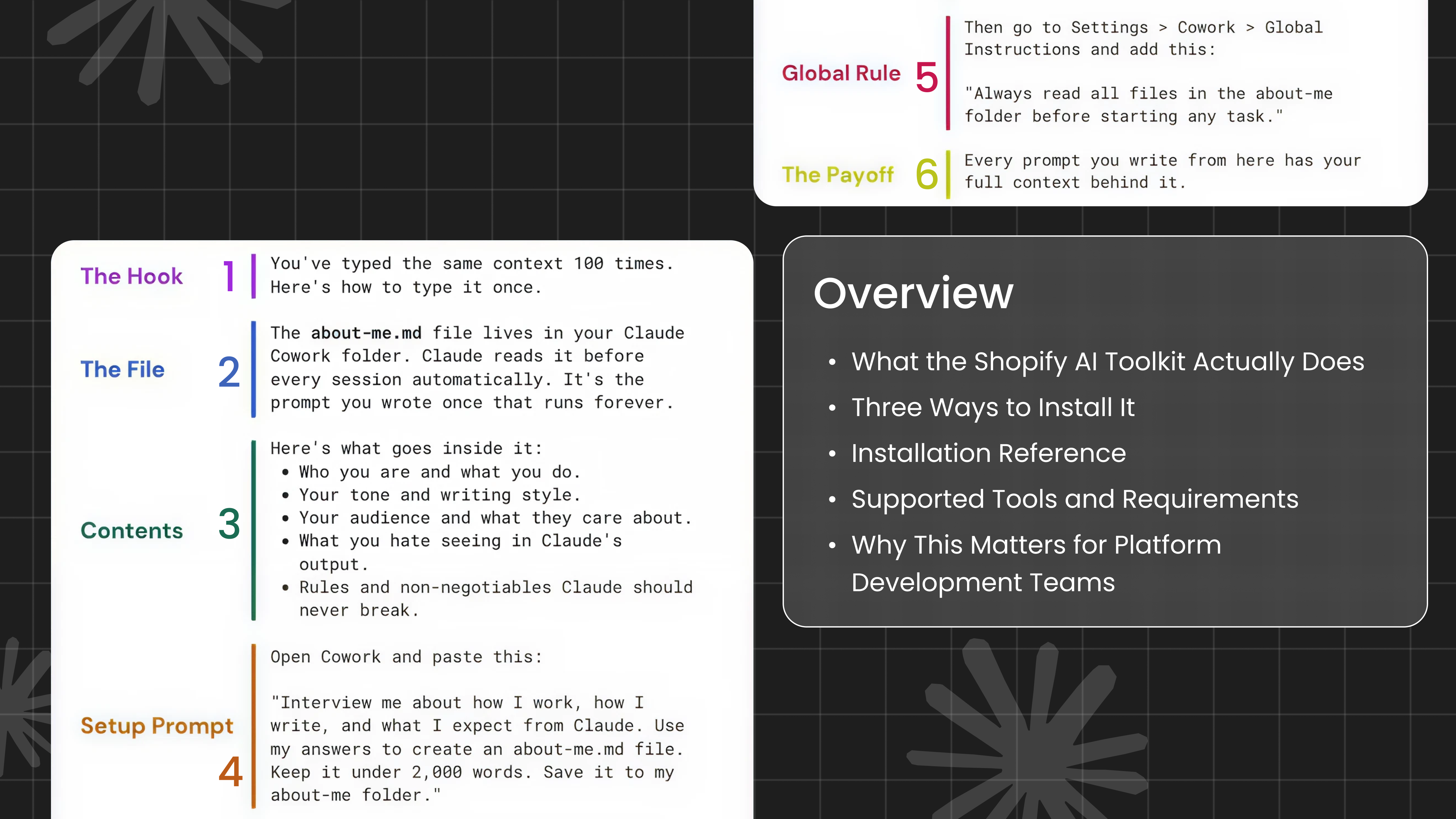
You've Typed the Same Context 100 Times. Here's How to Type It Once.
Every Claude session starts the same way for most people: re-explaining who they are, what they do, how they like to write, and what they expect. It's the same paragraph, typed slightly differently each time, adding friction before any real work begins.
There's a better way. It's called the about-me.md file, and once it's set up, you never type that context again.
What the about-me.md File Actually Is
The about-me.md file lives inside your Claude Cowork folder. Claude reads it automatically before every session starts. It's not a workaround or a hack, it's the intended way to give Claude persistent, session-level context without repeating yourself.
Think of it as the prompt you write once that runs forever.
What Goes Inside It
Five things belong in your about-me.md:
- Who you are and what you do
- Your tone and writing style
- Your audience and what they care about
- What you hate seeing in Claude's output
- Rules and non-negotiables Claude should never break
Keep it honest and specific. Vague instructions produce vague results. The more precisely you describe your standards, the more precisely Claude will match them.
The Setup Prompt
You don't have to write the file from scratch. Open Cowork and paste this exactly:
Code block:
"Interview me about how I work, how I write, and what I expect from Claude.
Use my answers to create an about-me.md file. Keep it under 2,000 words. Save it to my about-me folder."
Claude will ask you the right questions. Your answers become the file. The whole process takes under 15 minutes and pays back on every session after.
The Global Rule That Makes It Permanent
One more step. Go to Settings > Cowork > Global Instructions and add:
Code block:
"Always read all files in the about-me folder before starting any task."
That's it. From this point forward, every prompt you write has your full context behind it, automatically, every time, with no extra effort on your part.
Every prompt you write from here has your full context behind it. No more re-explaining your role. No more correcting tone mid-task. No more outputs that miss the mark because Claude didn't have enough to work with. One file. One global rule. Done.